Typing Speed for Jobs: How Many WPM Do Office, Data Entry and Support Roles Need?
Typing remains one of the most important digital skills in modern workplaces. Employees use keyboards to write emails, enter customer information, update CRM systems, prepare reports, respond to support requests, create documents, and manage business applications.
The **typing speed required for jobs** depends on the employee’s responsibilities, the amount of written work involved, and the level of accuracy expected. A general office employee may work effectively at 40 WPM, while a data entry specialist or live chat agent may need 60 WPM or more.
Words per minute should not be the only hiring benchmark. Accuracy, consistency, communication quality, software knowledge, and attention to detail are equally important. Employers should therefore use typing speed as one part of a broader skills assessment.
What Is the Average Typing Speed?
The average adult typing speed is generally around 35 to 45 words per minute. Employees who use computers regularly may type between 45 and 60 WPM.
A speed of approximately 40 WPM is usually sufficient for basic workplace tasks such as:
- Writing emails
- Updating simple records
- Preparing short documents
- Communicating through internal systems
- Entering basic customer details
- Working with spreadsheets
For roles involving high-volume documentation, live customer communication, or repetitive data processing, employers may expect a higher result.
A practical professional target for many employees is between 50 and 60 WPM with at least 95% accuracy.
Typing Speed Required for Jobs in General Office Work
General office roles include administrative tasks, email communication, report preparation, scheduling, document management, and data updates.
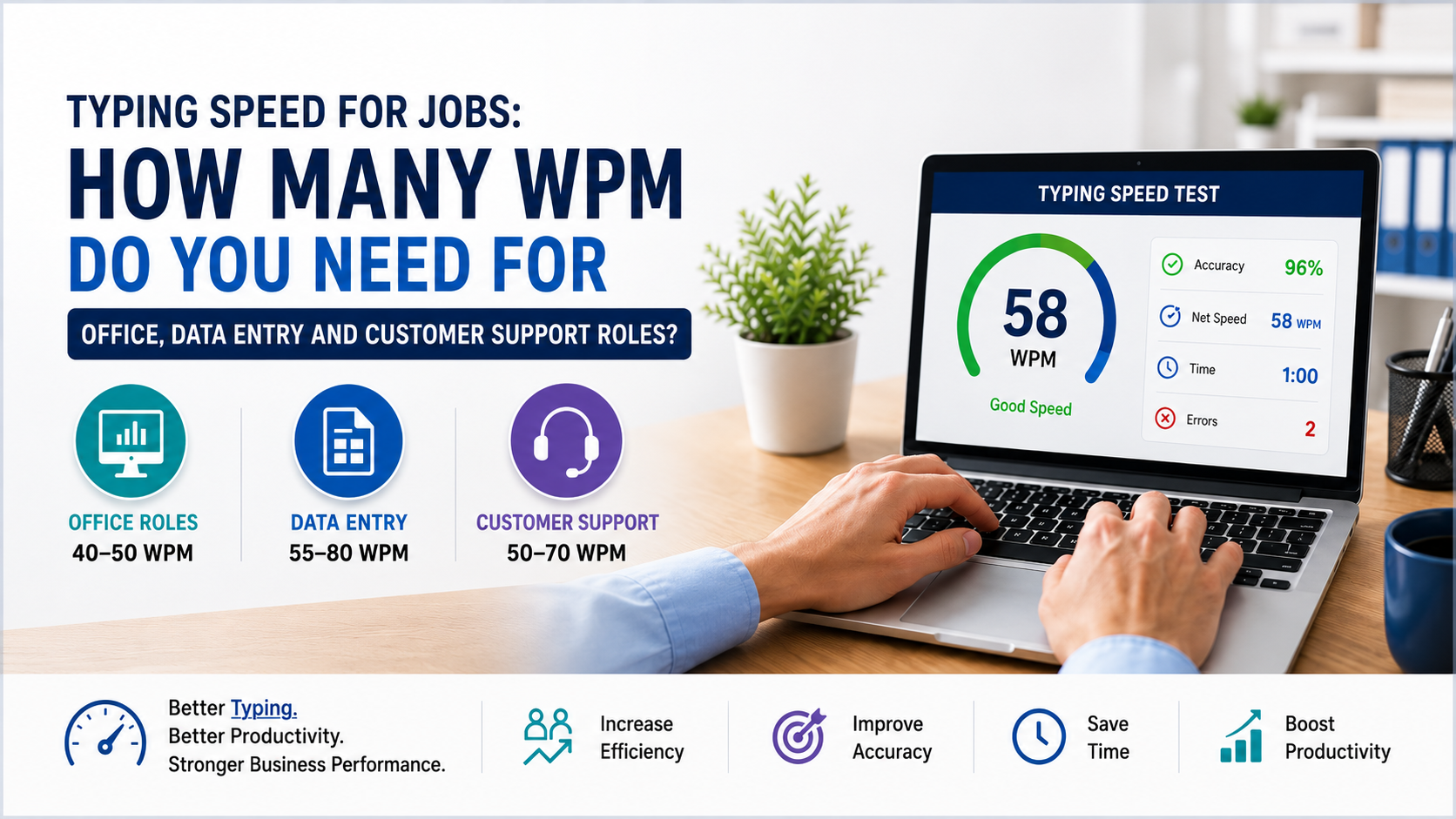
For most office positions, the recommended typing speed is between **40 and 50 WPM**.
Employees who prepare detailed reports, proposals, meeting minutes, contracts, or executive communication may benefit from reaching 50 to 65 WPM.
Recommended WPM for Office Roles
- Basic office assistant: 35–45 WPM
- General office employee: 40–50 WPM
- Office administrator: 45–55 WPM
- Executive assistant: 50–65 WPM
- Documentation-focused employee: 55–70 WPM
Accuracy is especially important when employees handle customer records, invoices, official documents, or confidential information.
Typing Speed Required for Data Entry Jobs
Data entry jobs usually require higher typing speed because employees spend a significant portion of their day entering and reviewing information.
The typical data entry typing speed is between **55 and 80 WPM**.
Entry-level employers may accept 45 to 55 WPM, while experienced data entry specialists may be expected to type at least 65 WPM. High-volume processing or transcription roles may require 75 WPM or more.
Recommended WPM for Data Entry Roles
- Entry-level data entry clerk: 45–55 WPM
- General data entry operator: 55–65 WPM
- Experienced data entry specialist: 65–80 WPM
- High-volume processing role: 75 WPM or higher
Speed must be balanced with accuracy. An employee typing 75 WPM with frequent mistakes may create more work than someone typing 60 WPM with excellent accuracy.
Incorrect data can negatively affect:
- Customer records
- Payroll
- Inventory
- Billing
- Financial reporting
- Compliance
- Business analytics
Employers should therefore measure both WPM and error rate during recruitment.
Typing Speed Required for Customer Support Roles
Customer support employees use email, live chat, ticketing systems, CRM platforms, and internal knowledge bases.
Email support agents may perform effectively at 45 to 60 WPM. Live chat agents often need between 55 and 70 WPM because they may handle several conversations at the same time.
Recommended WPM for Support Roles
- Email support agent: 45–60 WPM
- Helpdesk representative: 45–60 WPM
- Live chat agent: 55–70 WPM
- Technical support specialist: 50–65 WPM
- Customer support team leader: 45–60 WPM
Customer support requires more than fast typing. Employees must understand the issue, search for information, write clearly, use the CRM correctly, and maintain a professional tone.
A fast response is valuable only when it is accurate and helpful.
Typing Speed Required for Administrative and Technical Roles
Administrative professionals manage documents, reports, meetings, correspondence, and records. A speed of 45 to 60 WPM is generally suitable.
Technical professionals such as developers, system administrators, and IT support staff also use keyboards daily, but typing speed is not their main performance indicator.
Administrative Benchmarks
- Administrative assistant: 40–55 WPM
- Receptionist: 35–50 WPM
- HR administrator: 45–60 WPM
- Legal secretary: 55–75 WPM
- Medical administrator: 50–65 WPM
Technical Benchmarks
- IT support technician: 45–60 WPM
- Software developer: 45–65 WPM
- Business analyst: 45–60 WPM
- Technical writer: 55–75 WPM
- System administrator: 45–60 WPM
For technical roles, problem-solving, software knowledge, keyboard shortcuts, and accuracy often matter more than exceptional WPM.
Accuracy Matters More Than Speed Alone
Typing speed should never be evaluated without accuracy.
Frequent mistakes can lead to:
- Incorrect customer information
- Wrong invoice values
- Misspelled names
- Inaccurate business reports
- Poor customer communication
- Compliance risks
- Additional review work
For most professional roles, employees should aim for at least 95% accuracy. Data entry, finance, healthcare, legal, and compliance positions may require 97% accuracy or higher.
Employers should consider net WPM rather than gross WPM. Net WPM provides a more realistic score because it considers typing errors.
How Employers Should Use Typing Tests
Typing tests can be useful during hiring when keyboard skills are directly connected to the job.
Employers may use typing tests for:
- Data entry roles
- Customer support positions
- Administrative jobs
- Virtual assistant work
- Helpdesk roles
- Receptionist positions
- Documentation teams
- Transcription work
A good employment typing test should measure:
- Words per minute
- Accuracy percentage
- Error count
- Consistency over several minutes
- Ability to type numbers and punctuation
- Performance using realistic workplace content
- Ability to maintain quality under time pressure
A three-minute or five-minute test usually provides a more reliable result than a very short test.
Business Benefits of Strong Typing Skills
Stronger typing skills can generate measurable benefits across a business.
Increased Productivity
Employees can complete emails, reports, CRM updates, and administrative tasks in less time.
Faster Customer Service
Support agents can respond to more customers while reducing waiting times.
Better Data Quality
Accurate typing reduces mistakes in customer records, invoices, inventory systems, and reports.
Lower Operational Costs
Improved employee efficiency can increase output without immediately increasing team size.
Easier Technology Adoption
Employees with strong keyboard skills can adapt more easily to CRM systems, ERP platforms, cloud applications, and new workplace software.
Improved Employee Confidence
Confident typists can focus on business tasks rather than constantly searching for keys or correcting errors.
How Technology Can Reduce Manual Typing
Improving typing speed is useful, but businesses should also identify where repetitive typing can be reduced.
Modern digital tools can support:
- Automated data entry
- CRM workflow automation
- ERP integrations
- Digital forms
- AI-assisted email drafting
- Document generation
- Voice-to-text systems
- Customer support chatbots
- Automated ticket summaries
- Custom web and mobile applications
For example, a customer support agent may type 60 WPM, but an AI-enabled support system can suggest responses, retrieve customer information, and summarise conversations automatically.
Similarly, data entry teams may work faster with software integrations that transfer information between systems without repeated manual input.
The greatest efficiency gains often come from combining skilled employees with well-designed technology.
Why Businesses Choose Modern Digital Solutions
Manual processes are difficult to scale. They consume employee time, increase the risk of error, and reduce visibility across departments.
Modern digital solutions help businesses:
- Centralise data
- Automate repetitive tasks
- Standardise workflows
- Improve reporting
- Reduce processing delays
- Support remote teams
- Improve customer service
- Scale operations efficiently
Oxmite helps businesses evaluate manual workflows and implement practical technology solutions. These may include custom software, CRM systems, ERP platforms, AI-powered applications, workflow automation, cloud systems, mobile apps, web applications, SaaS platforms, and system integrations.
The goal is not simply to make employees type faster. It is to reduce unnecessary work and allow teams to focus on higher-value business activities.
Final Thoughts
The **typing speed required for jobs** varies according to the position and the amount of keyboard-based work involved.
For general office work, 40 to 50 WPM is usually sufficient. Administrative employees may need 45 to 60 WPM, while customer support agents often benefit from reaching 50 to 70 WPM. Data entry specialists may require between 55 and 80 WPM.
Employers should assess accuracy, consistency, communication ability, and software proficiency alongside typing speed.
Employees can use TypingSpeedCheck.com to measure their current WPM, identify weak areas, and compare their performance with professional job benchmarks.